Watch Video
Step by Step Tutorial
1Unzip the blog package you downloaded using WinZip. Free WinZip version is usually pre-installed in most Windows based computers. You may also use WinRAR.
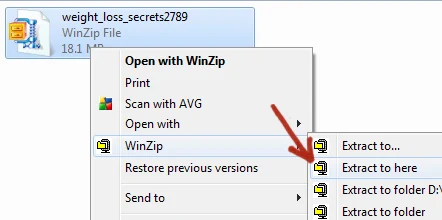
2Open the folder “Files To Upload“.

3What you should be seeing inside is the zipped wp-content file. In some blog packages such as this one there are some included files. You should upload that too.

4Upload it using your favorite FTP software or use the built in CPanel uploader. I used the CPanel Uploader.
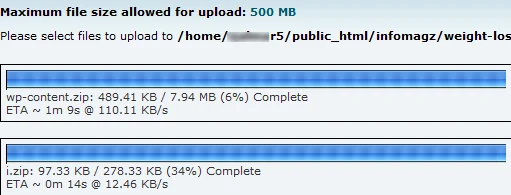
5Be sure to upload the file/s on the same directory where you earlier installed the new WordPress platform.
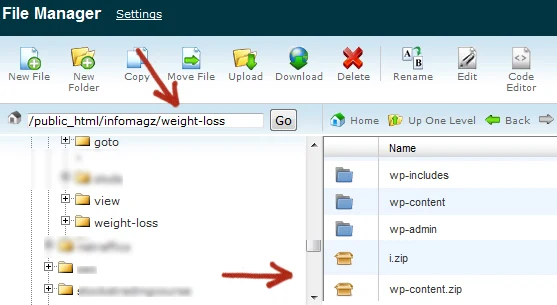
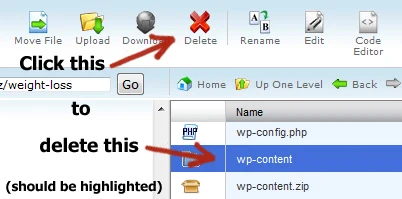
6Delete the existing wp-content file.
7Extract the newly uploaded wp-content.zip file.
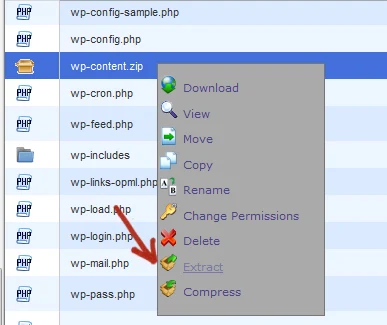
Warning: You should have deleted the old wp-content first before performing this step.
Extract also other files that are included in the upload files folder. In this case the i.zip file.
8After extracting the new wp-content folder and other file/s that comes with it, you should now delete the zipped file. Just be careful with this step as you may get confused and screw some important files.